Live presence, time and approvals, in English and French
Know who's in. Right now.
InOut replaces out-of-date shared calendars, spreadsheets and "are you in today?" messages with one live board. Clock in with one tap, see your hours add up, fill timesheets and approve requests in seconds. Designed for small businesses, it scales up to multinationals.
30-day free trial No credit card required Guided onboarding
Available in many languages
Every screen is translated, so each person works in their own language.
Microsoft sign-in
Sign in with Microsoft Entra ID and reach colleagues on Teams in one tap.
Full API access
Connect your systems, build your own tools and plug in your AI agents.
Phone and desktop
iPhone, Android, Windows and Mac, in light or dark theme.
Still asking "are you in today?"
Most teams track presence in five places that never agree. InOut puts it in one, and keeps it right.
Without InOut
Shared calendars and Teams statuses nobody keeps up to date Spreadsheets reconciled every Friday afternoon Chat threads asking who's in, who's out and who's back Vacation requests lost in someone's inbox
 With InOut
A live board each person updates in one tap Hours, breaks and weekly totals added up for you Timesheets checked against the punch clock Requests approved in seconds, with a comment
The product
Everything your team needs, in one app
Board, report, timesheet, requests and admin: the five tabs of InOut, on every phone and desktop.
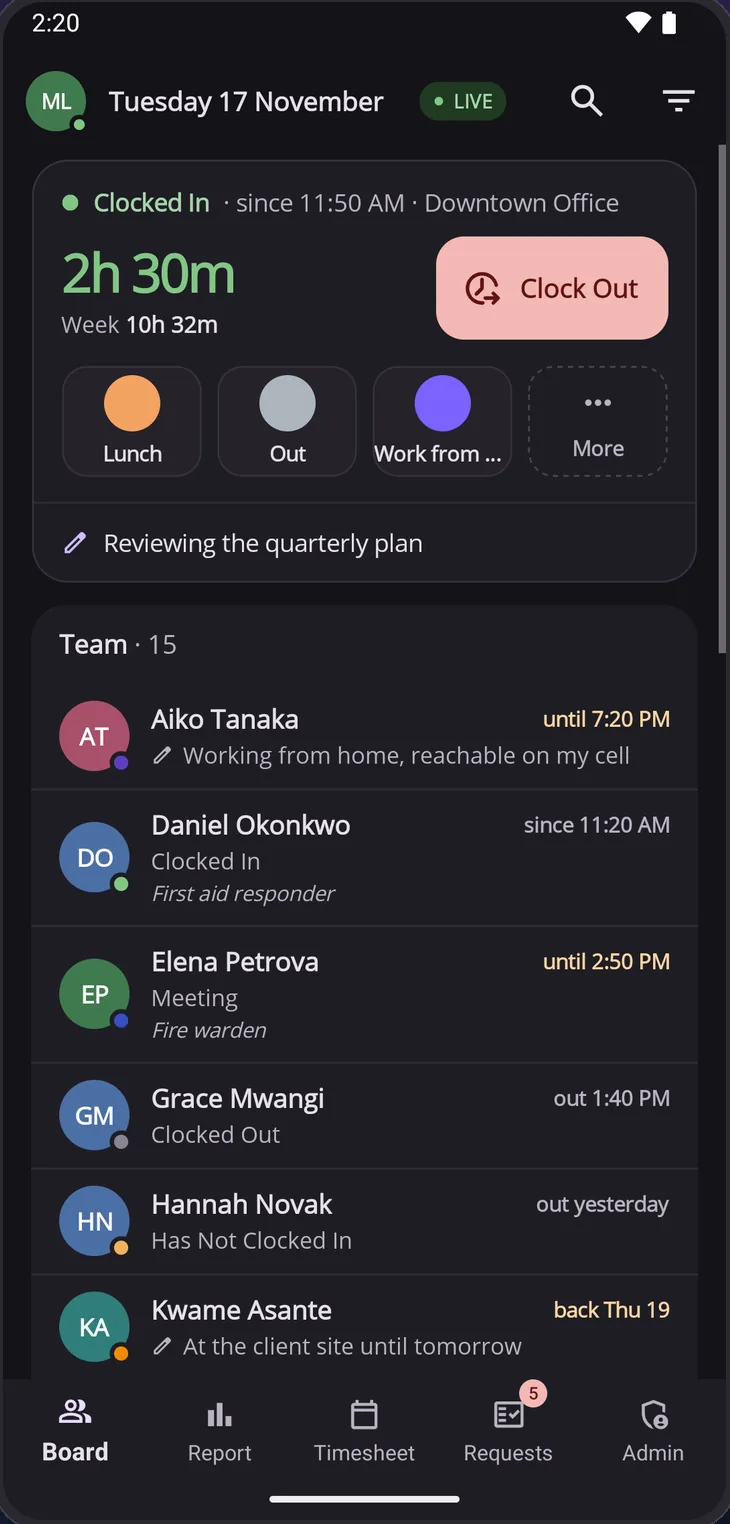
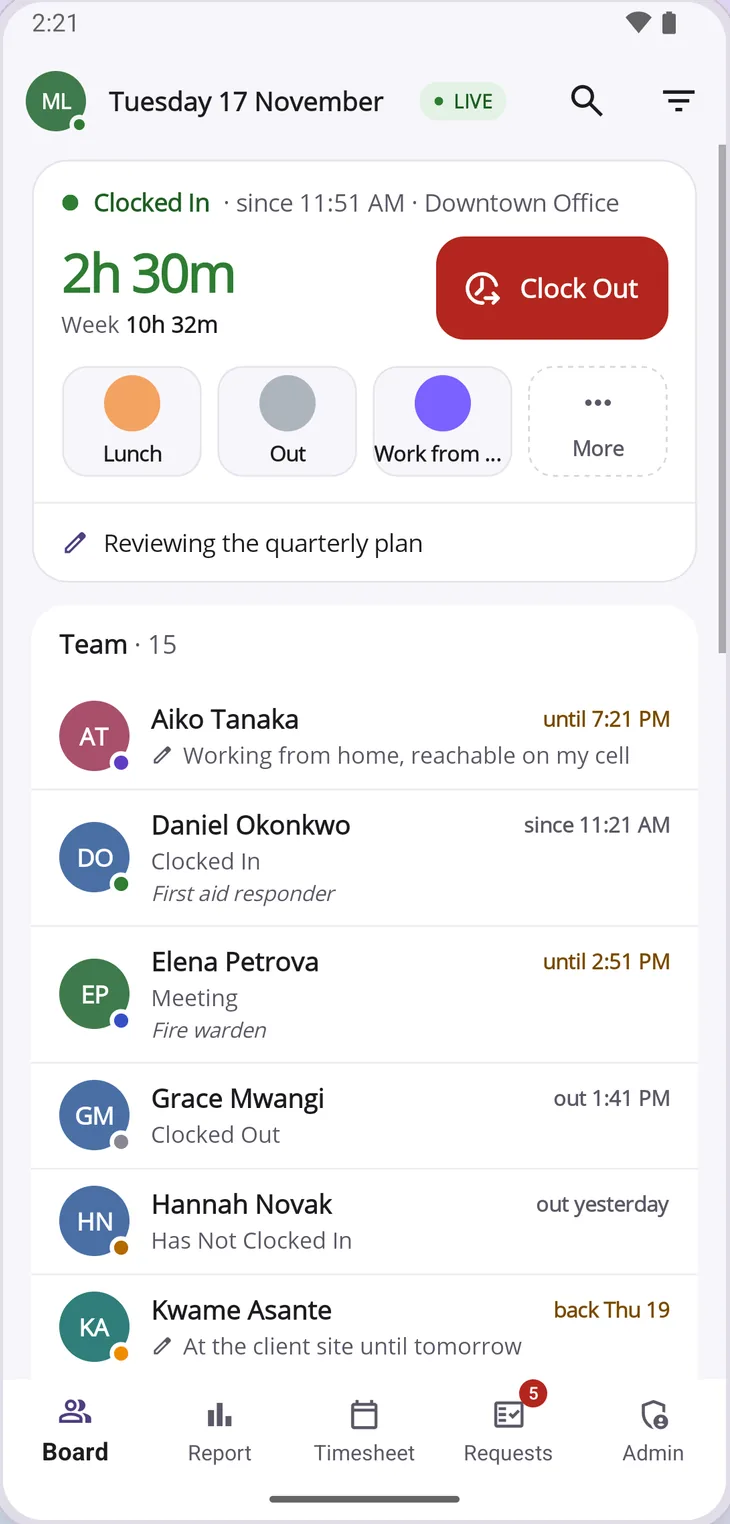
Your whole team's status, live: clocked in, in a meeting, at lunch, working from home or out until tomorrow. Everyone updates their own status, so the board is always right.
Clock in or out with one tap, with today's and this week's hours Quick statuses like Lunch, Out and Work from home, plus a personal note Safety roles such as first aid responder and fire warden, visible at a glance
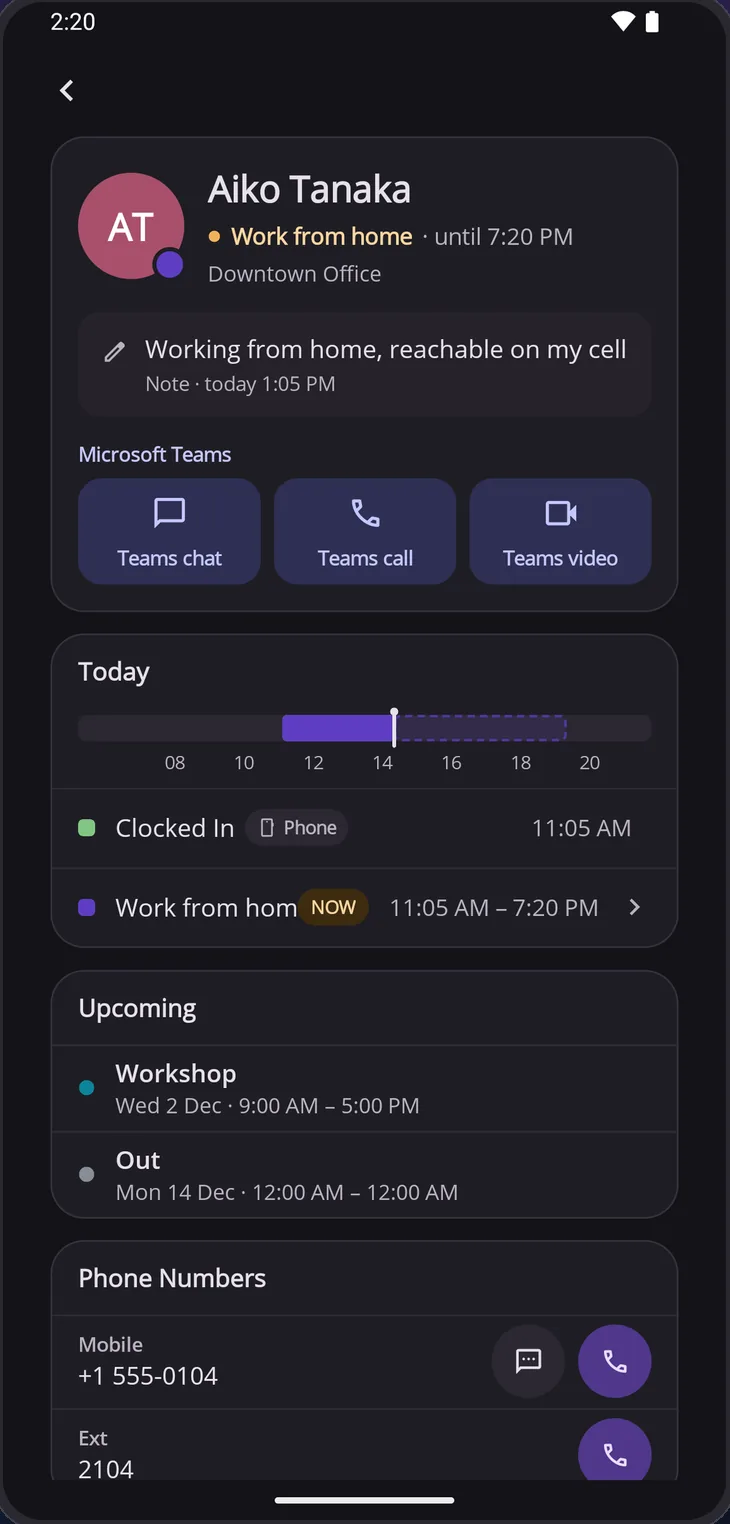
Status, schedule and contact details in one place. See where someone is, until when, and what is coming up next.
Microsoft Teams chat, call and video in one tap Today's timeline and upcoming activities Mobile and desk numbers, ready to dial
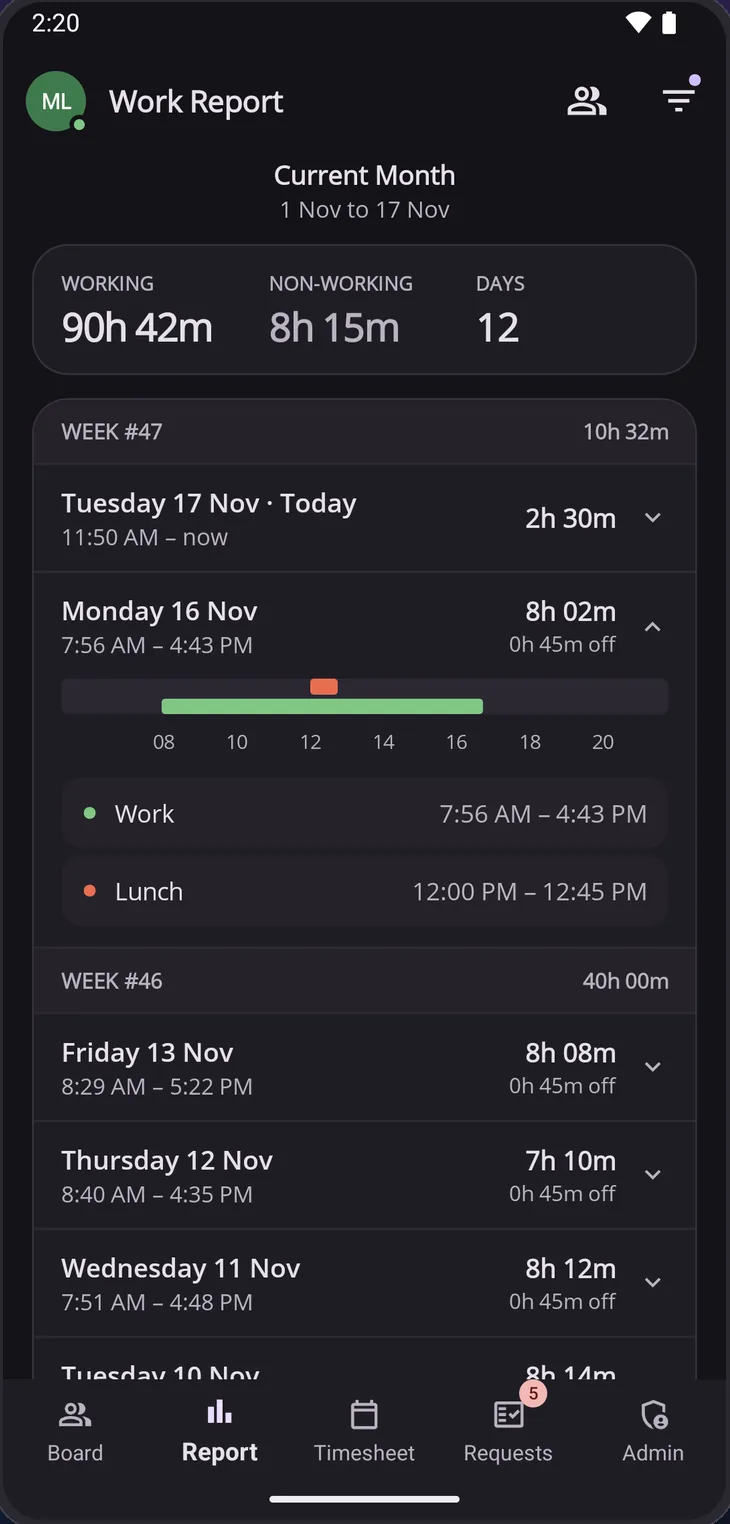
Every day, break and week, totaled automatically. No more adding up hours by hand at the end of the month.
Monthly totals of working and non-working time Week-by-week totals with each day's timeline Breaks such as lunch tracked separately
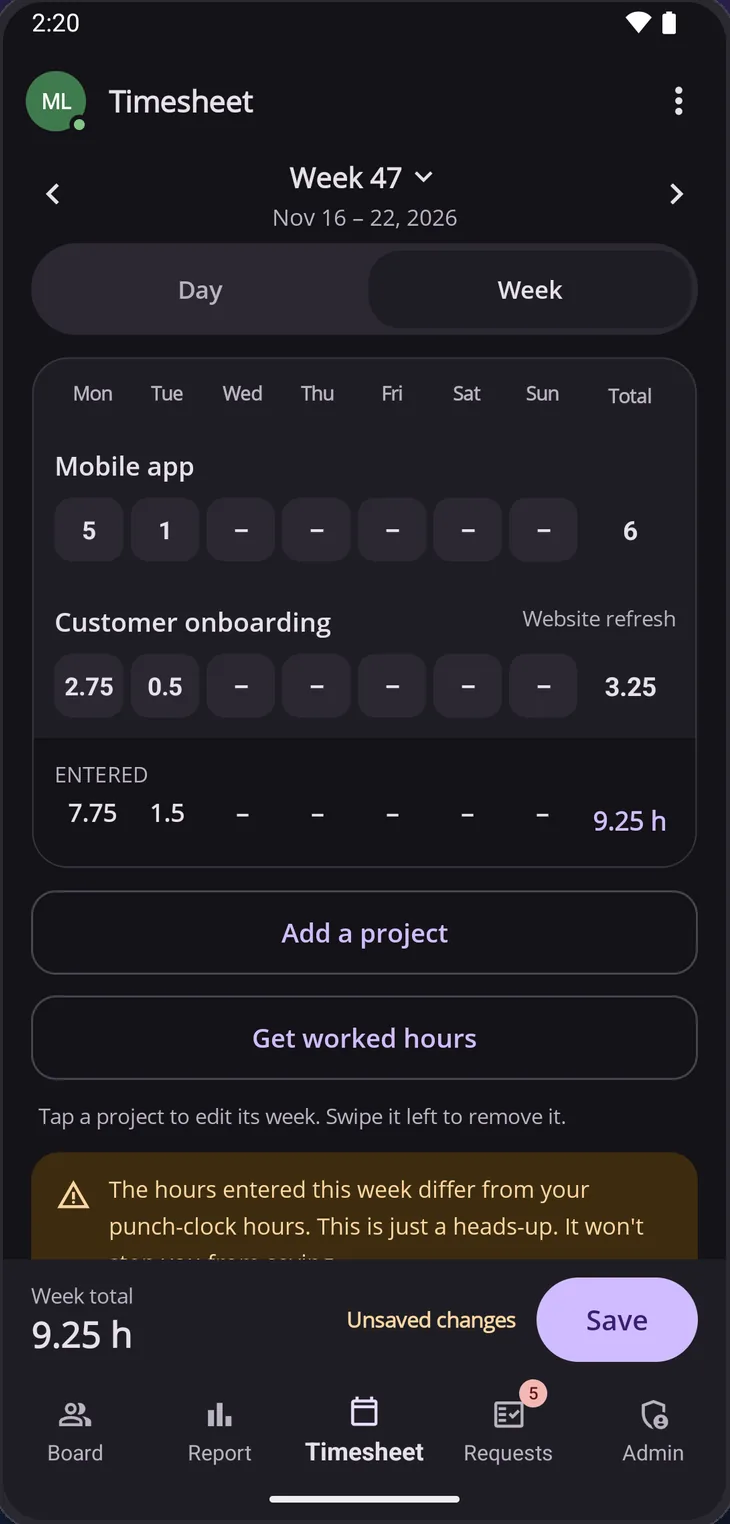
Log hours to your projects by day or by week, or fill them straight from the punch clock.
Get worked hours fills the week from clock-in data A heads-up when entered hours differ from punch-clock hours Day and week views, with a running weekly total
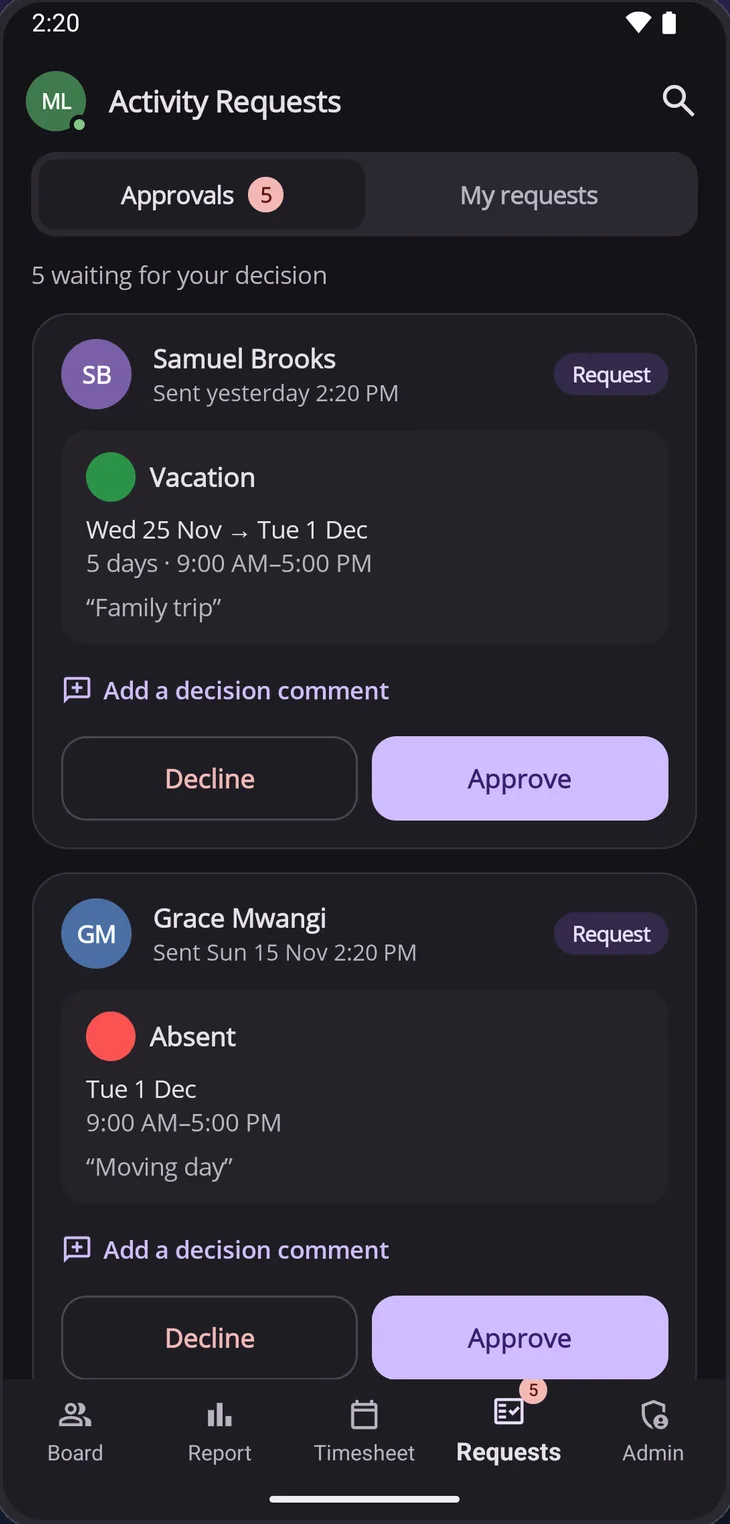
Vacation and absence requests arrive with dates, duration and reason. Supervisors approve or decline from their phone, with a comment.
A badge shows how many requests are waiting A decision comment the employee will see Employees follow their own requests under My requests
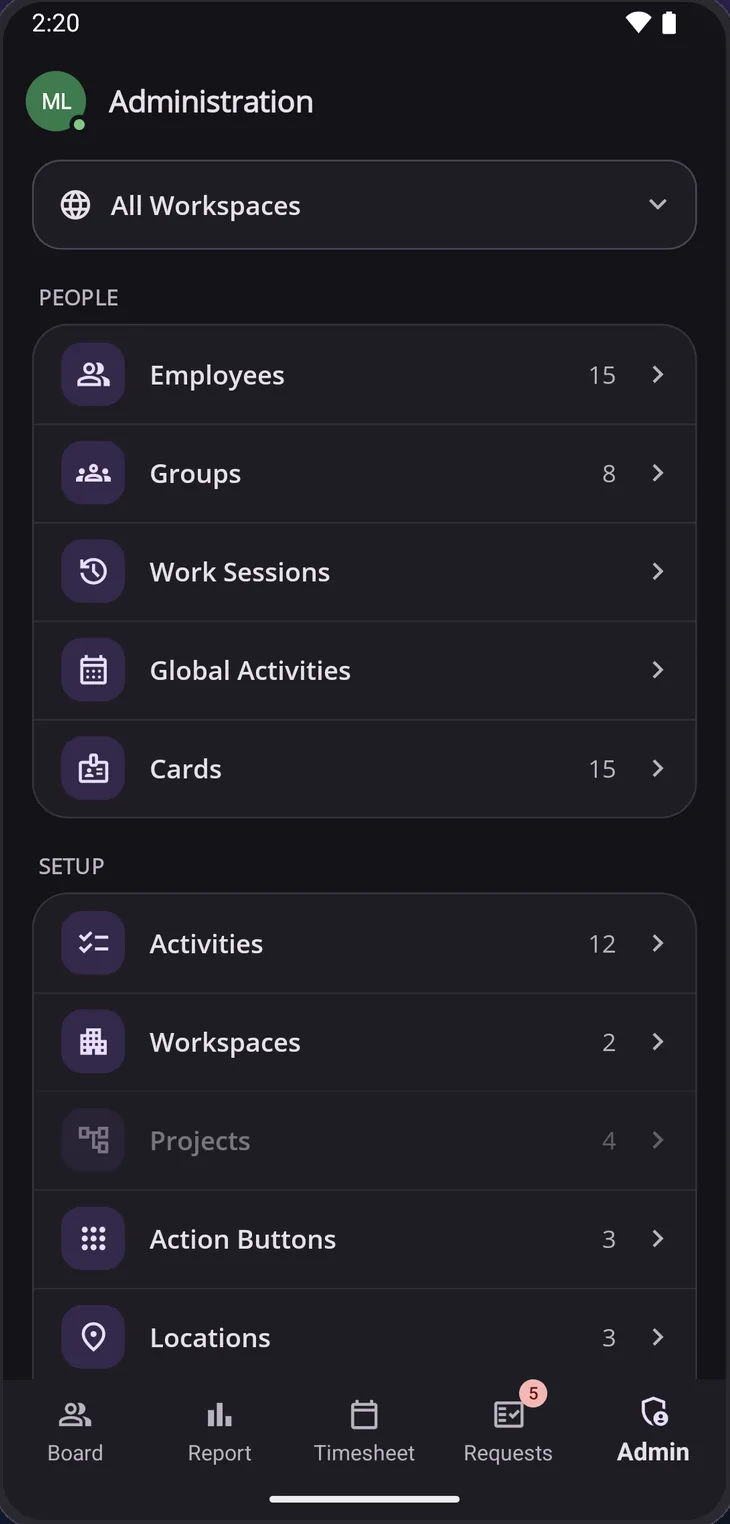
Employees, groups, cards and workspaces, managed from the same app, on the go.
Workspaces, locations and groups for multi-site teams Badge cards, activities and one-tap action buttons set up your way Work sessions you can review and correct
On the desktop
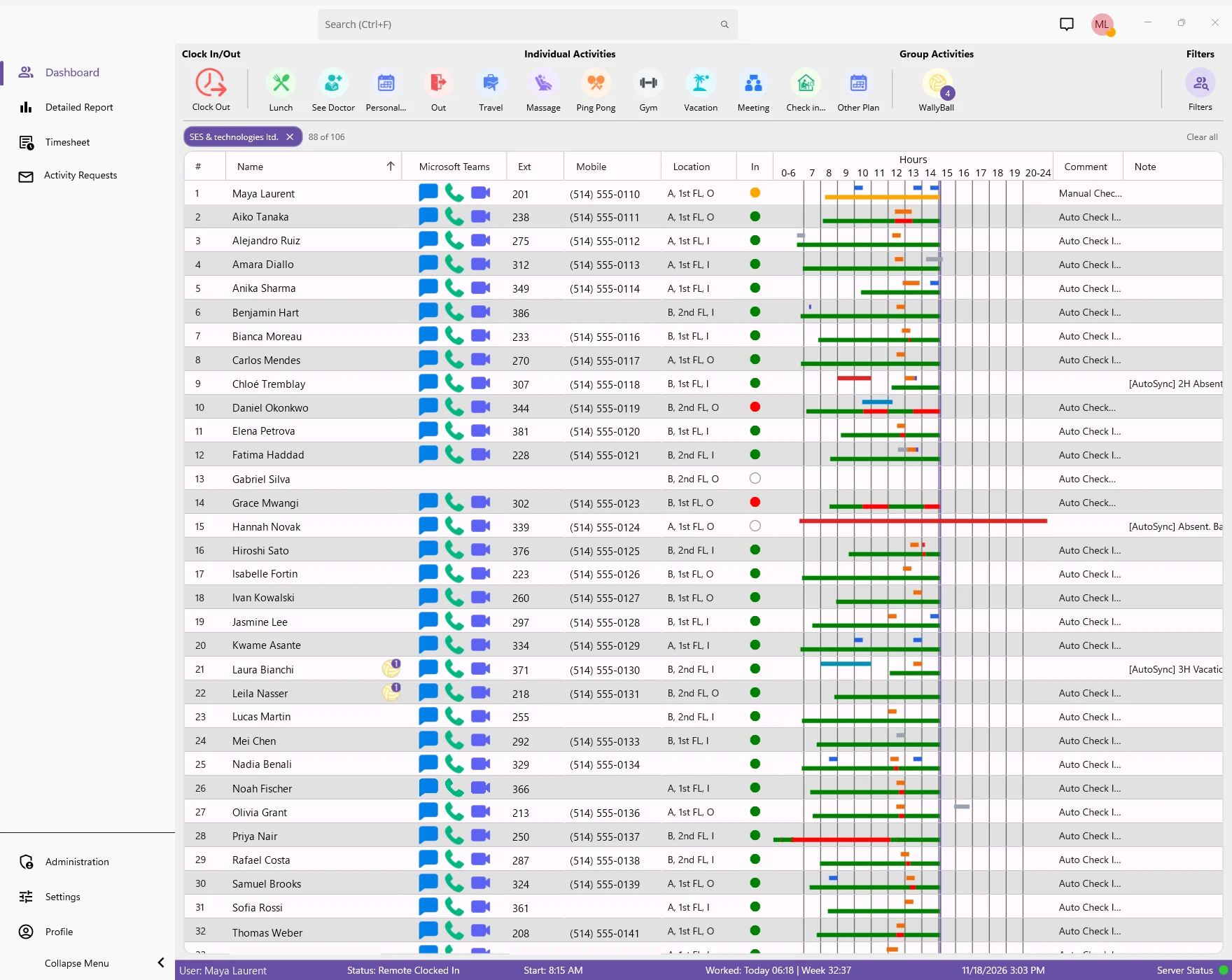
The whole team, on one screen
On Windows and Mac, in light or dark, InOut shows everyone's day at a glance: who is in, who stepped out, when they are back and how the day went, hour by hour.
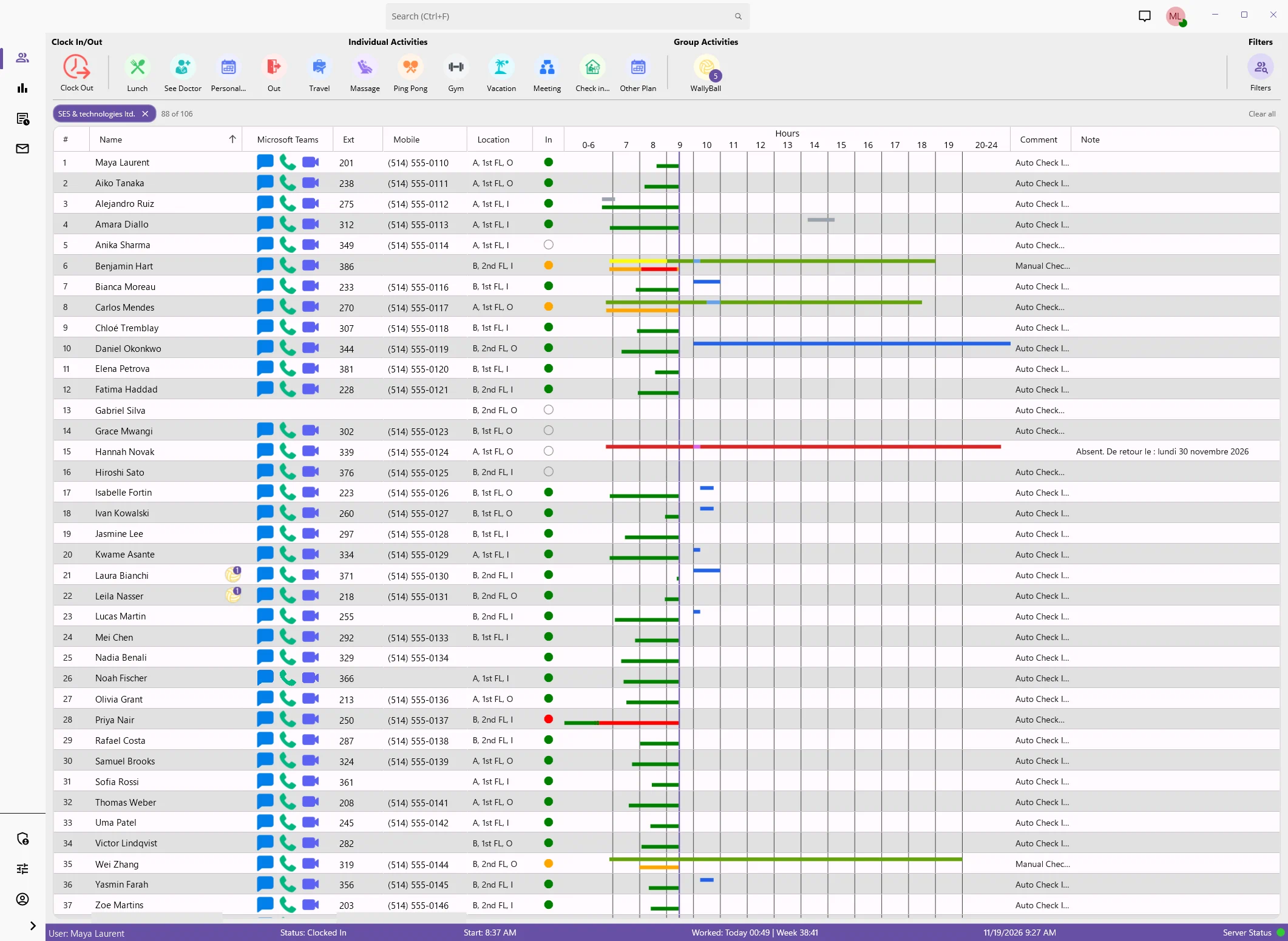
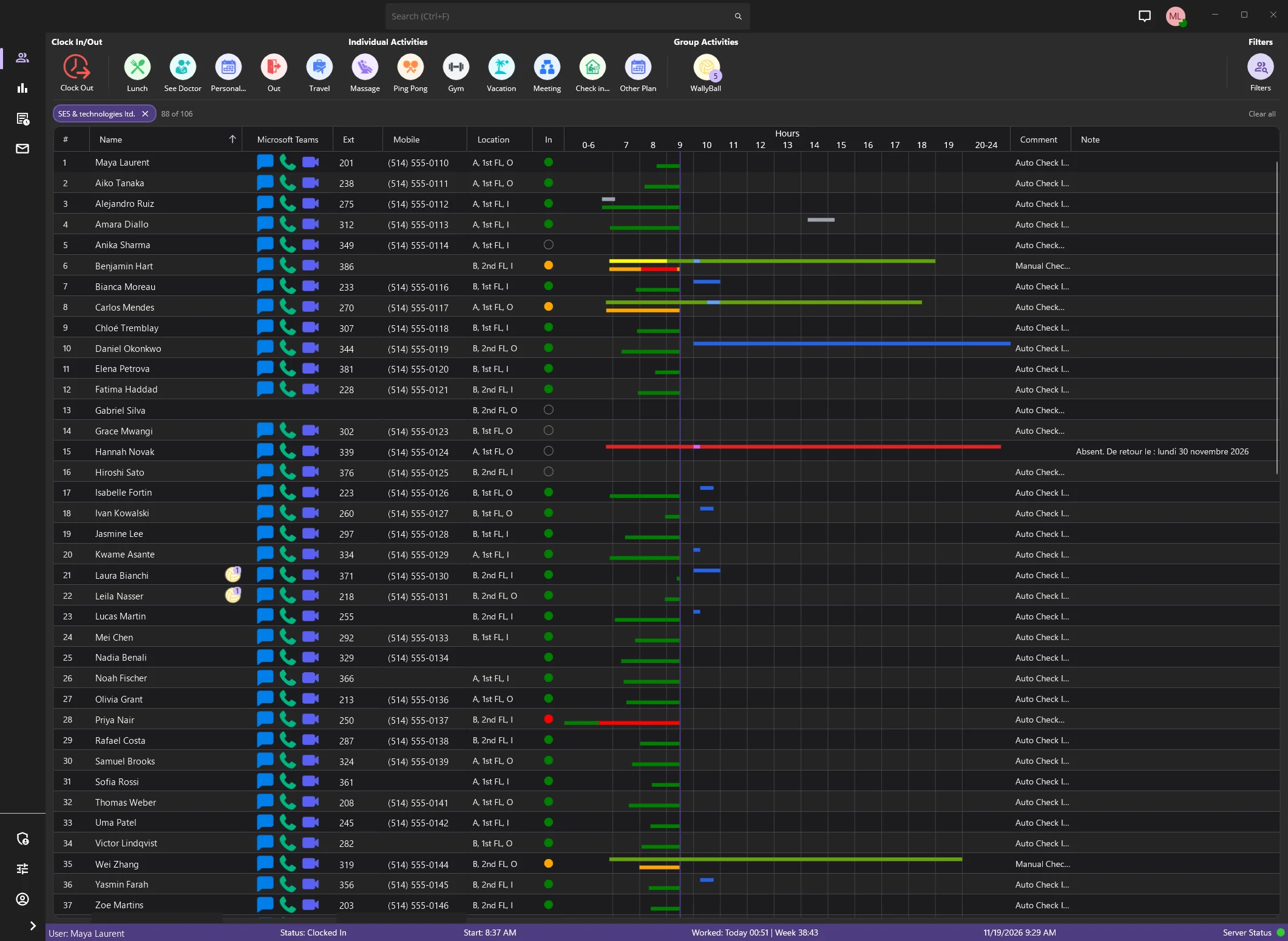
Drag the line to switch between light and dark.
One-tap activities
Lunch, travel, meeting, vacation and your own activities, one click away in the ribbon.
Everyone's day at a glance
A live timeline shows when each person came in, stepped out and came back.
Teams on every row
Chat, call or start a video with anyone, straight from the board.
Built for large teams
Filter by company, workspace, group or status to find anyone in seconds.
Everything in InOut, through the API
Anything you can do in the app, you can do through the API. Connect the systems you already have, build your own tools, automate InOut the way you want and plug in your AI agents.
Connect your existing systems
Send live presence and hours to your payroll, HR, ERP and reporting tools, and bring their data into InOut.
Build your own tools
Build the reports, dashboards and apps your business needs in your own tools, fed with InOut's data through the API.
Automate it your way
Clock-ins, activities, requests, approvals and reports: script any workflow in InOut.
Bring your AI agents
Give your AI agents secure, token-based access so they can read and act in InOut for you.
API access is included in the Professional plan.
Product tour
See InOut in 40 seconds
Clock in, check your hours, log a timesheet, approve a request and manage your team, start to finish.
One app, every role
Everyone sees what they need, and nothing they shouldn't.
Employees
Clock in with one tap, watch your hours add up and request time off without writing an email.
Supervisors
Know who is available right now and approve requests from anywhere.
Administrators
Set up workspaces, groups, cards and activities without calling IT.
Leadership
Real, time-stamped presence and hours across every team and site.
Proudly Canadian
Proudly Canadian, made for the world
Built in Québec to the standards of demanding customers around the world: certified to ISO/IEC 27001, SOC 2 audited, and ready for teams in any country.
ISO 27001 certified, SOC 2 audited
SES is certified to ISO/IEC 27001:2022, and an independent SOC 2 Type II audit tested its security controls.
Privacy built in
No biometric data: people clock in with the app, and SES's Privacy Officer answers every privacy request.
Ready for teams worldwide
Translated screens, time zones and multi-site workspaces for teams in any country.
Hours you can rely on
Daily hours, breaks and weekly totals recorded automatically, ready for your labour-standards records.
Built by SES
Backed by an engineering software company since 1978
InOut is made by SES & technologies ltd., headquartered in Laval, Québec, the company behind CDEGS: the industry-standard software for analyzing power system grounding, electromagnetic fields, electromagnetic interference (EMI) and transient phenomena, scientifically validated for more than forty-five years. SES runs its own teams on InOut, every day.
- Founded
- 1978
- Head office
- Laval, Québec
- International offices
- China · Europe · India
- Company certifications
- ISO/IEC 27001:2022 · SOC 2 Type II
Simple pricing, per active employee
Billed annually, in Canadian dollars. That's about 17% less than paying month to month.
Standard
Presence and time for every team
$4.92 per active employee / month
Professional
More workspaces and API access for growing organizations
$6.58 per active employee / month
Questions, answered
What is InOut?
InOut is a workforce presence and time platform: a live board of who is in, out or away, one-tap clock-in, work reports, project timesheets and request approvals, on phone and desktop, in English and French.
Who is InOut for?
Designed for small businesses, InOut scales up to multinationals with many teams, sites and workspaces. It fits manufacturing, engineering and technical services, professional services, healthcare support, logistics and multi-site offices.
Does InOut replace our payroll or HR system?
No. InOut tracks presence, hours, activities and approvals, and works alongside your payroll and HR systems.
Which devices does InOut run on?
InOut runs on iPhone, Android, Windows and Mac, in a light or dark theme that follows the device.
Does InOut have an API?
Yes. Everything you can do in InOut, you can do through its API, with secure tokens: connect your payroll, HR or ERP systems, build your own tools and automations, or let your AI agents work with InOut. API access is included in the Professional plan.
How do people sign in?
With their Microsoft work account (Microsoft Entra ID). From any profile, colleagues can start a Teams chat, call or video in one tap.
How much does InOut cost?
InOut is priced per active employee per month, with about 17% off when billed annually, and every plan starts with a 30-day free trial. The pricing page has both plans and a cost calculator.
Ready to see who's in?
Book a demo and see InOut with your own teams, sites and activities, in English or French.
30-day free trial · No credit card required · Guided onboarding